Imagine this. You have been uploading consistently for months. Your channel crossed 1,000 subscribers. You got into the YouTube Partner Program. Your AdSense dashboard is showing earnings real money and suddenly you realise you have no idea how to actually get that money into your bank account.
If that sounds familiar, you are absolutely not alone. How to withdraw YouTube money is one of the most searched questions among Indian creators, and yet most guides either give you half the information or confuse you with jargon. So let’s fix that right now step by step, in plain language, with everything you need to know for 2026.
How YouTube Actually Pays You The Basic System
Before anything else, let us understand the route your money takes.
YouTube does not directly deposit earnings into your bank account. Your money first goes into your Google AdSense account, which acts like a digital wallet linked to your YouTube channel. Once your AdSense balance crosses the minimum payment threshold, Google transfers the money to your chosen payment method — which for Indian creators, is your bank account.
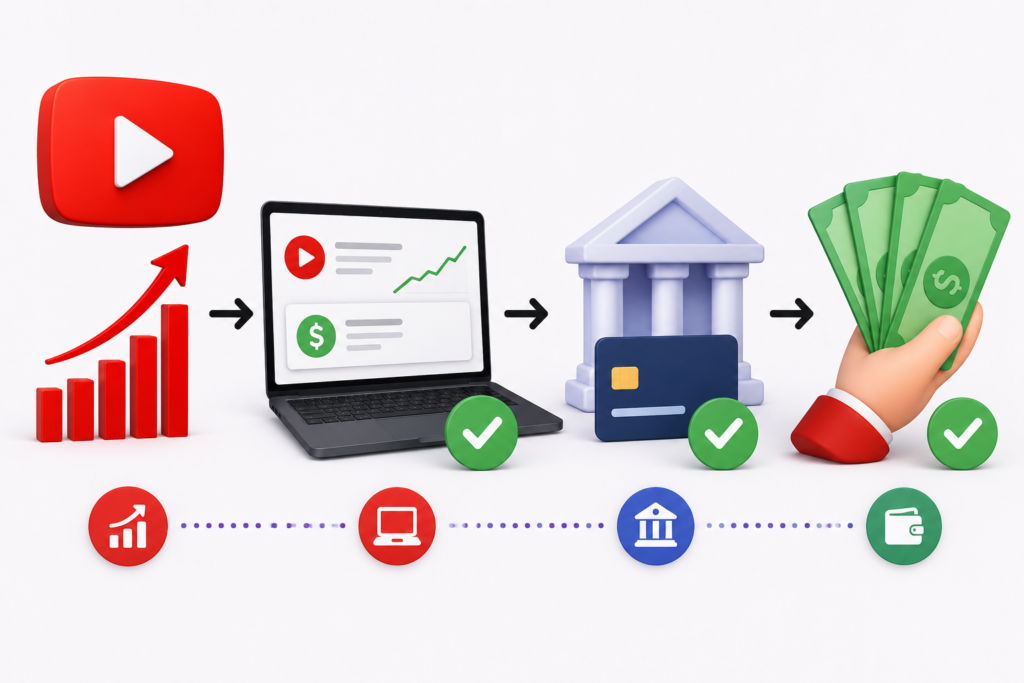
So the path is: YouTube earnings → Google AdSense → Your Bank Account.
Everything happens through AdSense. That is the central system you need to set up and understand.
Step-by-Step Guide: How to Withdraw YouTube Money in India
Step 1 — Join the YouTube Partner Program
Before you can earn anything through AdSense, you need to be in the YouTube Partner Program (YPP). The eligibility requirements in 2026 are 1,000 subscribers and 4,000 public watch hours in the past 12 months or alternatively 1,000 subscribers and 10 million Shorts views in 90 days.
Once you meet these conditions, you apply for YPP through YouTube Studio under the Earn tab. After review and approval, which can take a few days to a few weeks, your channel becomes monetized.
Step 2 — Link Your AdSense Account
During the YPP application process, YouTube will ask you to link a Google AdSense account. If you already have one, you sign in with the same Google account. If not, you create one right there — the process is guided and takes only a few minutes.
Your AdSense account is where all your YouTube earnings — from ads, YouTube Premium, Super Chats, channel memberships — will accumulate each month.
Step 3 — Add Your Bank Account as Payment Method
This is the step that actually gets money moving to your account. Here is how to do it:
Sign in to your AdSense account at adsense.google.com. Click on Payments in the left navigation panel, then Payments info. Click Manage payment methods, and then Add payment method. From the available options in India, you will see Electronic Funds Transfer (EFT) or Wire Transfer to Bank Account. Choose EFT it is faster, cheaper, and recommended for Indian creators.
Now enter your bank details exactly as they appear on your bank statement or passbook — your account number, IFSC code, account holder name, and bank name. Double-check every digit. Incorrect bank details are one of the most common reasons payouts fail.
After saving your details, Google will send a small test deposit to your account within a few days to verify it is real and active. Once you receive this amount, you need to go back to AdSense, enter the exact test deposit figure to confirm, and your bank account is verified and ready to receive payments.
Important: Any changes to your payment method should be completed before the 20th of the month. Changes made after the 20th may not be reflected in the current month’s payout cycle.
Step 4 — Verify Your Address with the AdSense PIN
When your AdSense balance first crosses ₹1,000 (approximately $10), Google will trigger a mandatory address verification process. A 6-digit PIN code is mailed to your registered address in India typically via post or courier through Google’s delivery partner.
This PIN usually arrives within 3 to 6 weeks in India. Once you receive it, go to AdSense → Payments → Manage settings, find the verification section, enter your 6-digit PIN, and click Submit. Your address is now verified.
Until this PIN is entered, your AdSense account cannot make payouts even if your balance is above the payment threshold. This is why completing it promptly matters.
Step 5 — Submit Your Tax Information (W-8BEN Form)
This step is mandatory for all YouTube creators worldwide, including Indian creators. And it is the one step most people overlook until it costs them money.
As an Indian creator, you need to submit a W-8BEN form inside AdSense. This form tells Google that you are not a US tax resident. Without it, Google is legally required to withhold up to 24 to 30% of your global earnings as US tax not just the income from US viewers.
Here is how to submit it: Go to AdSense → Payments info → Manage settings → scroll to “United States tax info” → click Add tax info → select W-8BEN (for individual creators).
Fill in your legal name as it appears on your PAN card, select India as your country of citizenship and tax residency, enter your Indian address, and provide your PAN number as your Foreign TIN. You do not need a US tax ID number. Under treaty benefits, choose Article 12 (Royalties) and enter 15% this activates the India-US Double Tax Avoidance Agreement, which reduces US withholding on your YouTube income to just 15%, applicable only on revenue from US-based viewers.
The W-8BEN form is valid for approximately three years. Set a reminder to renew it before it expires, as an expired form means Google reverts to the maximum withholding rate automatically.
Step 6 — Cross the Payment Threshold and Wait for Payout
Your AdSense earnings from YouTube accumulate through the month. YouTube transfers earnings data to AdSense between the 7th and 12th of the following month. Google then processes payouts between the 21st and 26th of that month, provided your balance crosses the minimum payment threshold.
For Indian creators using EFT, the payment threshold is approximately ₹7,000 to ₹8,000 (roughly $100). If your balance has not crossed this amount by the end of the month, it simply rolls over and adds to your next month’s earnings. Your money never disappears it just waits until you hit the threshold.
Once Google issues the payment, it takes approximately 4 to 10 business days for the amount to appear in your Indian bank account depending on your bank and any intermediary processing involved.
Withdrawal Methods Available for Indian Creators — A Comparison
For Indian creators in 2026, two main payment methods are available through AdSense:
Electronic Funds Transfer (EFT)
EFT is the most recommended method for Indian creators. Earnings are deposited directly into your Indian bank account in Indian Rupees (INR), with conversion happening automatically. It is fast, typically arriving within 4 to 10 business days after Google issues the payment. There are no significant extra charges on your end, though your bank may apply a small incoming transfer fee. Banks like SBI, HDFC, ICICI, and Canara Bank all handle this reliably.
EFT suits the vast majority of Indian creators. It is straightforward, secure, and the closest thing to a “set and forget” payment method.
Wire Transfer
Wire transfer works similarly to EFT in that it deposits money directly into your bank account, but it goes through international banking infrastructure (SWIFT). This method tends to be slower, sometimes taking up to 15 business days, and can carry higher processing fees from both Google’s side and your receiving bank. It is useful if EFT is not working for your specific bank, but EFT is generally the better option.
Cheque (Physical)
Google still offers physical cheque payments for India. A cheque is mailed to your address and can take 2 to 4 weeks to arrive, after which you deposit it at your bank and wait for clearance. This is the slowest and least convenient option. Most Indian creators should avoid it unless no other option is available.
For most Indian creators: EFT is the best choice. It is the fastest, most reliable, and least expensive way to get your YouTube earnings into your bank account.
Understanding Payment Timelines — When Does the Money Actually Arrive?
This is where many creators get confused. Let us break it down simply.
Say you earn ₹10,000 in January. That income is not paid out in January it is transferred from YouTube to your AdSense account between the 7th and 12th of February. Then Google issues the actual payout between the 21st and 26th of February. After that, your bank receives it within 4 to 10 business days. So realistically, January’s earnings reach your account somewhere in early March.
This means there is always a 6 to 8 week gap between when you earn money on YouTube and when it physically arrives in your bank account. This is completely normal and expected not a delay or error. Planning your finances with this cycle in mind avoids unnecessary stress.
Tax Obligations for Indian YouTube Creators
This section matters enormously and most guides skip it. Please read it carefully.
Indian Income Tax
YouTube earnings in India are classified as business income. This means you are required to file an ITR (Income Tax Return) annually. If your total income exceeds the basic exemption limit (currently ₹2.5 lakhs for individuals), income tax is payable according to your applicable slab rate.
If your YouTube income is your regular and primary source of earnings, advance tax must be paid quarterly — typically in June, September, December, and March. Missing advance tax payments attracts interest under Sections 234B and 234C of the Income Tax Act.
GST
If your total income from YouTube and other services crosses ₹20 lakhs in a financial year, GST registration becomes mandatory. YouTube ad revenue may have specific GST treatment discuss this with a CA to understand your obligations clearly.
US Withholding Tax — The W-8BEN Connection Again
As mentioned in the setup steps, Google withholds US taxes on income from US-based viewers. With a properly submitted W-8BEN and the India-US treaty claim under Article 12, this withholding rate drops to 15% and applies only to the US-sourced portion of your earnings. Your Indian income is not subject to US withholding.
Download your Form 1042-S from AdSense each year this shows the US taxes withheld on your account. You can claim these as a Foreign Tax Credit in India by filing Form 67 before your ITR deadline, which prevents the same income from being taxed twice.
When to get professional help: Once your YouTube income crosses ₹3 to 4 lakhs annually, involving a CA who understands digital creator income is genuinely worth the fee. The compliance landscape ITR, GST, advance tax, US withholding, FEMA compliance for foreign remittances has real complexity, and getting it wrong is expensive.
Troubleshooting Common YouTube Withdrawal Issues
My Payment Is Delayed or On Hold
If your payment has not arrived by the end of the month following the payout date, first check your AdSense Payments page for any alert banners or hold notices. Common reasons for holds include incomplete tax information, an unverified payment method, a pending address (PIN) verification, or a policy compliance issue on your account.
Resolve each alert one by one. Once completed, payouts typically resume in the next monthly cycle. If no alerts are showing but the payment is still missing after 5 business days from the issue date, contact your bank first sometimes delays happen on the banking side, not AdSense.
My AdSense PIN Is Not Arriving
In India, the PIN can take 3 to 6 weeks due to postal delays. If it has not arrived after 4 weeks, you can request a replacement PIN from inside AdSense. You are allowed to request a PIN up to 3 times via standard post.
If all three PIN attempts fail which can happen in areas with unreliable postal delivery use Google’s PIN troubleshooter for alternative verification using government ID. In India, an Aadhaar card, PAN card, or passport are accepted as alternative identity documents. This route bypasses postal verification entirely. Until the PIN is verified, your payments are on hold but your earnings are completely safe and accumulated in your account.
My Payment Was Rejected or Failed
Payment rejections usually happen because of incorrect bank details a wrong account number, a mistyped IFSC code, or a name mismatch between AdSense and your bank records. Go to AdSense → Payments → Manage payment methods, delete the existing incorrect entry, and re-add your bank details carefully. Make sure every digit matches your bank passbook or statement exactly.
A rejected payment typically returns to your AdSense balance and will be re-issued in the next payment cycle once your details are corrected.
Numbers in YouTube Studio and AdSense Do Not Match
This is normal and not an error. YouTube Studio shows estimated revenue in real time these are provisional figures. AdSense shows finalized revenue, which may be slightly lower after invalid click deductions and ad adjustments. The AdSense figure is the one that actually pays out.
Best Practices for Smooth and Secure YouTube Payouts
Set up your payment method and tax information on the same day you get approved for YPP — do not wait until your first payout is due. A lot of creators lose their first month’s payout window simply because their setup is incomplete.
Always double-check your bank details before saving them. One wrong digit in your account number means a failed payment and a one-month delay.
Make any payment method changes before the 20th of the month. After that date, your change may not take effect until the next cycle.
Renew your W-8BEN form before it expires every three years. An expired form triggers maximum US tax withholding automatically.
If you are serious about growing your channel and want the right audience to find your content the kind that improves your CPM and makes your channel attractive to brand deals NexTech Ads India, based in Kolkata, offers YouTube promotion services and targeted digital advertising campaigns built specifically for Indian creators. Growing your viewership with the right audience directly impacts how much you earn per view and opens doors to brand partnerships that far exceed AdSense income.
Frequently Asked Questions About Withdrawing YouTube Money in India
1. How to withdraw YouTube money in India? Your YouTube earnings go to Google AdSense. Set up EFT (Electronic Funds Transfer) as your payment method in AdSense, verify your bank account with a test deposit, complete the PIN verification and W-8BEN tax form, and once your balance crosses ₹7,000 to ₹8,000, Google automatically issues your payout between the 21st and 26th of each month.
2. What is the minimum amount to withdraw from YouTube in India? The payment threshold for EFT in India is approximately ₹7,000 to ₹8,000 (around $100). If your balance is below this at the end of the month, it rolls over to the next month until you cross the threshold.
3. How long does it take for YouTube money to arrive in my bank account? After Google issues the payment between the 21st and 26th, EFT payments take 4 to 10 business days to reach your Indian bank account. Overall, expect 6 to 8 weeks from when you earn to when you receive it.
4. Can I withdraw YouTube money without a bank account? No direct method exists to withdraw to cash without a bank account in India. You need a savings or current account linked to AdSense via EFT. Google does not support UPI or wallet transfers directly.
5. What is the W-8BEN form and do I need it? Yes, all non-US creators including Indian YouTubers must submit a W-8BEN form in AdSense. Without it, Google may withhold up to 24 to 30% of your global earnings for US taxes. With it properly filed, withholding drops to 15% and applies only to revenue from US viewers.
6. What bank is best for receiving AdSense payments in India? SBI, HDFC Bank, ICICI Bank, and Canara Bank are all commonly used and reliable for receiving EFT payments from AdSense. Choose the bank where you already have an account for simplicity.
7. My AdSense PIN is not coming what should I do? Wait 4 to 6 weeks from the PIN request date. If it has not arrived, request a replacement from AdSense. After 3 failed attempts, use Google’s PIN troubleshooter to verify your identity using government-issued ID like Aadhaar or PAN card.
8. Is YouTube income taxable in India? Yes. YouTube income is treated as business income in India and must be declared in your annual ITR. Income tax applies as per your slab. If your annual service income crosses ₹20 lakhs, GST registration is also required. Consult a CA for personalized guidance.
9. Can I change my payment method in AdSense? Yes, you can add a new payment method and set it as primary at any time. Changes made before the 20th of the month take effect in the current payout cycle. Changes after the 20th apply from the next month.
10. Why does the amount in YouTube Studio differ from AdSense? YouTube Studio shows estimated real-time earnings, which are provisional. AdSense shows the finalized amount after adjustments like invalid clicks are removed. The AdSense figure is always the one that gets paid out.
Growing your YouTube channel with the right audience is what turns views into real income. Visit NexTech Ads India Kolkata’s trusted YouTube promotion service for Indian creators who want to grow smart.