
Keeping track of your YouTube subscriber count and even seeing who those subscribers are is both exciting and important. Every creator and influencer in India loves watching that subscriber number tick up, but do you know how to actually view and analyze those subscribers? In this guide, we’ll explain step-by-step how to check your YouTube subscribers on mobile and desktop, why some may be hidden, and how understanding your audience can help your channel grow. We’ll also share tips to boost your subscriber count because after all, more engaged subscribers means better reach on YouTube. Let’s dive in!
How to View Your YouTube Subscribers on Mobile
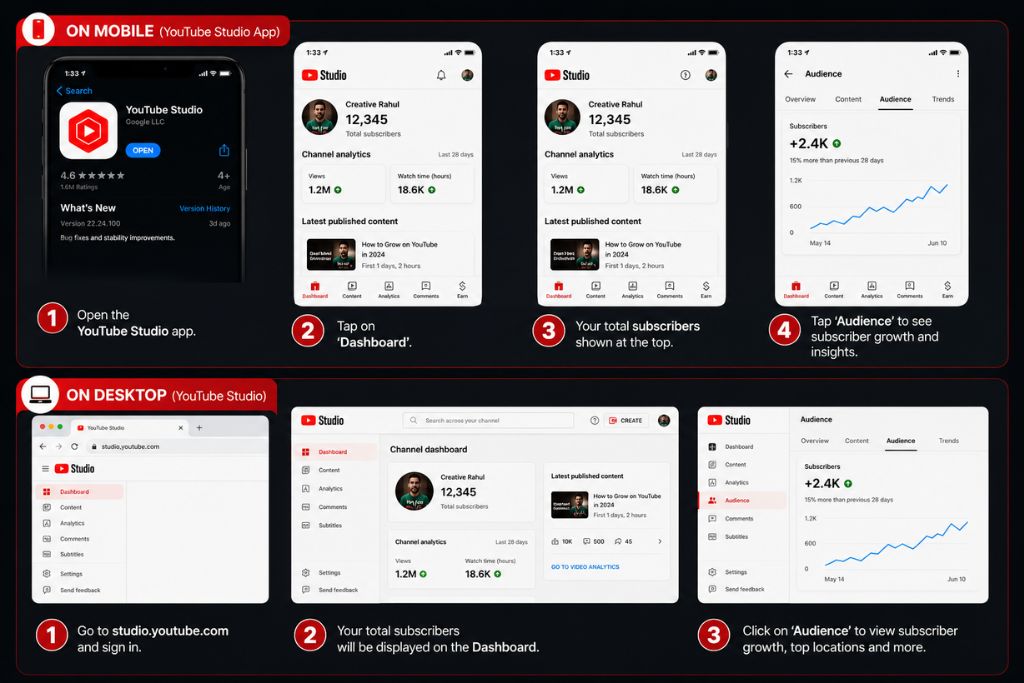
If you primarily use YouTube on your phone, you may have noticed there’s no straightforward list of who is following you. On mobile devices, YouTube does not let you see your full subscriber list. However, you can check your total subscriber count in a couple of taps. Simply open the YouTube app (or the YouTube Studio app), tap your profile avatar in the corner, and select “Your channel.” Your current subscriber count will be displayed at the top of the channel page.
For a quick check-in, the YouTube Studio mobile app (Android or iOS) is handy: it shows your subscriber count on the dashboard right under your profile picture. Beyond seeing the number of subs, you won’t see names or details on mobile YouTube reserves that for the desktop version. But at least on your phone you can celebrate every new follower as soon as it happens!
How to See Who Your YouTube Subscribers Are on Desktop
To actually see which accounts have subscribed to your channel, you need to use YouTube Studio on a computer. Here’s how:
- Log into YouTube Studio. Click your profile icon on YouTube and choose YouTube Studio from the menu.
- Go to the Dashboard. In the Studio Dashboard, scroll until you find the Recent Subscribers or Recent Activity panel.
- Click “See all subscribers.” This opens a window listing recent subscribers. You’ll see each subscriber’s channel name, profile picture, subscription date, and their own subscriber count.
This list shows your most recent subscribers, and you can sort it by date or by how many subscribers they have. It’s a quick way to recognize fellow creators who like your content! (In fact, if some big channels in your niche have subscribed, this is where you’ll see it.) You can even click on a subscriber’s channel icon to visit their page or subscribe back.
Keep in mind: only subscribers who have set their subscriptions to public will appear here. If someone keeps their sub list private (which many do by default), they won’t show up in this list. So don’t worry if the number of names is lower than your total count YouTube is just respecting users’ privacy settings.
Why You Can’t See Everyone Who Subscribes
It might feel strange, but there’s a reason you can’t see every single subscriber on the list. YouTube allows each user to keep their channel subscriptions private. By default, most people have their subscription privacy turned on, so when they subscribe to you, their name stays hidden. You’ll only see subscribers who have chosen to make their subscription public.
In other words, your YouTube Studio list always underrepresents your actual audience. There may be many more people who love your channel but aren’t showing up by name in your dashboard. The upside is that you can still see that their numbers added up. But it does mean the “Recent Subscribers” list is just a peek at part of your fanbase a slice of your most recent, public-facing followers.
Benefits of Knowing Who Your YouTube Subscribers Are
So why bother checking who your subscribers are, if you only see some of them? Because even limited insights can be hugely valuable for your channel. Your subscribers are by definition your core audience the viewers most likely to enjoy and engage with your content. Understanding a bit about them helps you create better videos that keep your fans excited and attract even more people.
For example, browsing your public subscriber list might inspire new video ideas. If you notice many of your subscribers upload similar content or share certain themes, you could explore those topics. Uppbeat explains that subscribers’ own uploads can spark ideas you’re not copying them, just getting inspiration for subjects that resonate with your audience. Maybe you have a cooking channel and see your subscribers often post about vegan recipes. That tells you to experiment with more vegan cooking content.
Moreover, seeing who your audience is can help you tailor videos to their interests. Perhaps your subscribers include lots of gaming fans, or travel vlog enthusiasts. By aligning your content with what they love (or by adding new formats they enjoy), you build loyalty. Uppbeat notes that by “snooping around” your subscribers’ channels, you get a solid picture of common interests, whether it’s a genre (like RPG games) or a format (like short clips). The result? Videos that your fans happily watch start-to-finish, which signals to YouTube that your content is engaging. That engagement in turn boosts your videos in recommendations, fueling a virtuous cycle of growth.
Finally, knowing your subscribers can even lead to collaborations. If you see creators among your subscribers, it may be a good sign to reach out. Collaborating with channels your audience already watches can expose your content to new viewers who are likely interested. (It’s a win-win: both channels share audiences.) For example, Uppbeat highlights a case where two cooking channels cross-promoted by sharing recipes, helping each other gain subscribers. Keep an eye on your “Recent Subscribers” list for fun possibilities like that!
Tips for Growing Your YouTube Subscriber Count
Of course, checking subscribers is only one part of the journey the other part is getting more of them. Here are some friendly tips to grow your channel’s subs the smart way:
- Focus on Retention, Not Just Views: Create videos that keep people watching all the way through. The YouTube algorithm loves longer watch times. Hook viewers in the first seconds and keep the energy up it makes people more likely to subscribe.
- Consistently Upload Quality Content: Try to maintain a regular schedule (like weekly or biweekly videos). Consistency builds trust with viewers. When your audience expects new content, they’re more likely to subscribe so they don’t miss out.
- Engage with Your Viewers: Reply to comments and ask for feedback. If a viewer feels connected, they’re more inclined to subscribe. You can casually invite them too a heartfelt “if you found this helpful, hit subscribe” at the end of a video can work wonders.
- Use SEO and Keywords: Include relevant keywords in your video title, description, and tags to appear in searches. For example, if you’re targeting a local Indian audience, use regional language keywords or trending local topics. This helps new viewers find your videos.
- Create Eye-Catching Thumbnails: A good thumbnail grabs attention. Use bright visuals and concise text (if any) to make people curious. A higher click-through rate (CTR) from thumbnails can lead to more subscribers.
- Promote on Social Media and Beyond: Share your videos on Facebook, Instagram, X (Twitter), WhatsApp groups, or embed them in your blog. Tailor the promo content to each platform (like a short teaser video or a catchy caption) to draw in more viewers.
- Run Contests or Giveaways: Even simple giveaways (like shoutouts or small prizes) in exchange for subscribing can boost numbers. Make it fun and relevant to your channel theme.
- Use Playlists and Cross-Promos: Organize videos into playlists so viewers binge more of your content. Also, add cards and end screens that link to your other videos to keep people on your channel longer. Longer sessions usually translate into higher subscriber conversions.
Remember, growing subscribers takes time and patience. But every new sub is a real person who enjoys your content and that’s incredibly motivating! Combine these tips with the insights you learn from your subscriber list and analytics (below), and you’ll be setting your channel up for steady growth.
Learn What Your Viewers Watch by Checking YouTube Analytics
Beyond just looking at names in your subscriber list, YouTube Analytics is a goldmine for understanding your audience. In YouTube Studio’s Analytics > Audience tab, you can see detailed reports about what your viewers (including subscribers) are doing on YouTube. For instance, the “Channels your audience watches” report shows what other channels your viewers like. This is great for spotting trends and collaboration opportunities. The “What your audience watches” report lists videos (on any channel) your audience viewed recently, which can spark new video ideas for you.
Another useful report is “Formats your viewers watch” it tells you if your audience prefers traditional videos, Shorts, or live streams. You can adapt accordingly. Perhaps your fans watch lots of YouTube Shorts; experimenting with short-form content might bring in more subscribers. The analytics also show when your viewers are online, and basic demographics, so you know when and for whom you’re creating videos. All this data helps you tailor your strategy to keep your current subscribers happy and attract new ones.
More YouTube Subscriber Insights and Promotion
As you gather data on your subscribers, you may want to dig even deeper. Tools like vidIQ or other analytics extensions can supplement YouTube Studio. For example, vidIQ’s channel audit features can give you insights on subscriber behaviors and channel growth. Their YouTube Analytics Scorecard shows which videos your subscribers watch and which channels they follow. This kind of information helps you understand exactly what content your fans enjoy, so you can make more of it.
Of course, getting more subscribers often also means promoting your channel beyond organic reach. Targeted YouTube video promotion services can help with that. At NexTech Ads India, we specialize in promoting videos to the right audience in India. Unlike generic ads, our focus is solely on YouTube we know how to get your channel in front of viewers who are likely to subscribe. All you need to do is pick a promotion plan on our site, share your video link and targeting preferences (like specific states or languages), and our Kolkata-based team will handle the rest. Our years of experience mean we’ll research your niche, find the best audience segments, and launch campaigns that bring real viewers to your channel.
In summary, don’t just watch your subscriber number get to know your subscribers. Use desktop YouTube Studio to see who’s on your list, analyze what they’re watching, and apply those insights to make content they love. Combine that with smart promotion (like targeted services from NexTech Ads India) and engagement strategies, and you’ll see your subscriber count climb steadily. After all, every big YouTuber started with zero the key is understanding your audience and consistently giving them value. Happy creating, and here’s to growing your YouTube community in 2026 and beyond!