
An impression on YouTube happens any time your video’s thumbnail is shown on a user’s screen. In simple terms, it’s a first “hello” between your video and a potential viewer. Every time YouTube displays your thumbnail – whether on the Home feed, search results, subscriptions feed, or the suggested (Up Next) sidebar – that counts as one impression. Impressions measure visibility, not views. In other words, they show how many eyes saw your thumbnail (your “potential audience”), even if they didn’t click play.
Impressions are counted only on YouTube’s own platform. For example, thumbnails displayed on the YouTube app, website (search, home page, subscriptions, recommended), or smart TVs count as impressions. However, external embeds or ads do not count towards organic impressions. An impression is registered only if the thumbnail is on-screen for at least one second and at least half visible. (Quick scrolls or clipped views won’t register.) In short, impressions tell you how often YouTube is showing your content to people.
Finding and Checking Your YouTube Impressions
To grow your channel, you’ll want to track this metric in YouTube Studio. Where to find impressions: Log into YouTube Studio, then click Analytics in the left menu. From the top tabs, select Reach (or Content) to see the Impressions graph. You can even click an individual video under the Content tab and view its impressions chart.
To make it concrete, here’s a quick step-by-step:
- Open YouTube Studio: Sign in at studio.youtube.com.
- Go to Analytics: Click Analytics from the left sidebar.
- View Impressions: Select the Reach tab (or the Content tab for a specific video). The page will show Impressions, Click-Through Rate (CTR), and other reach metrics.
Once you’re there, you’ll see your total impressions (how many times thumbnails were shown) and the corresponding CTR (see below). If you want to compare videos, sort them by impressions or select each to view individual stats. The key is that impressions are a high-level measure of how often YouTube is offering your videos to viewers.
What Do YouTube Impressions Show You?
Impressions reveal your potential audience. They answer “How many people could click my video?” rather than “How many actually did.” If your title and thumbnail are compelling, a higher number of impressions usually leads to more views. For instance, the analytics might show that a thumbnail was served 10,000 times – that’s 10,000 chances to grab a viewer’s attention.
However, impressions by themselves don’t guarantee success. If you see lots of impressions but relatively few views, it signals that your thumbnail or title may need a refresh. In a sense, impressions tell you where and how often YouTube is distributing your video. They help diagnose whether the platform is giving your content a fair shake. High impressions with low clicks means viewers see the thumbnail but aren’t convinced to click. In that case, tweaking the thumbnail/title or content can help.
Impressions vs. Views: What’s the Difference?
It’s easy to mix these up, but impressions and views are not the same. As one guide puts it: “An impression happens when the thumbnail is displayed. A view happens when someone clicks and watches”. In practice, your views will always be less than your impressions. Many people will see the thumbnail (impression) but not click. Conversely, a view might come from someone who navigates directly to the video (which YouTube might not count as an impression).
For example, if you have 10,000 impressions and 500 of those people click and watch, your Click-Through Rate (CTR) is 5%. Importantly, views from external sources (like embedded videos on blogs, or shared direct links) may not count as impressions. So you can even have more views than impressions if a lot of traffic comes from outside YouTube. Impressions measure visibility; views measure action. Both matter, but remember: impressions are the funnel leading to views.
Impressions Click-Through Rate (CTR)
Closely tied to impressions is the impressions click-through rate (CTR). This is simply the percentage of impressions that turned into views. For example, a CTR of 5% means 5 out of every 100 impressions became views. According to YouTube’s own data, half of all channels and videos have an impression CTR between about 2–10%. Young channels or new videos can see even wider swings. A very low CTR (say under 2%) usually means viewers are skipping your thumbnail, suggesting it may not be compelling enough. A very high CTR (above 10–15%) is unusual but can indicate clickbait – often followed by low watch-time.
In analytics, YouTube shows CTR in the Reach report alongside impressions. It’s a critical gauge: a healthy CTR (roughly 2–10%) implies your title/thumbnail are matching audience interest. If CTR dips, try refreshing the title or thumbnail to better match what users are searching for or curious about. In short, impressions CTR shows how well you’re turning visibility into views.
Key YouTube Metrics
| Metric | What It Means |
|---|---|
| Impressions | How many times your video’s thumbnail was shown on YouTube (home feed, search, recommended, etc.). |
| Impressions CTR | The percentage of impressions that resulted in views (how often someone clicked after seeing your thumbnail). |
| Views | The number of legitimate views your video received (how many people actually watched it). |
| Unique Viewers | The estimated number of different people who watched your content in a given time frame. |
| Watch Time | Total hours (or minutes) that viewers have spent watching your video. (Shows overall engagement but updates more slowly.) |
These metrics (often visible on the Key Metrics card in YouTube Studio) help you diagnose performance. Impressions and CTR tell you reach, while views and watch time tell you engagement. By comparing them, you can spot issues (for example, high impressions+low CTR means tweak thumbnail/title). We’ll focus on impressions here, but keep the full picture in mind: high impressions are good, but they mean the most when they convert into views and watch time.
What Normal Impression Counts Look Like
Impression counts can vary wildly by channel size and niche. Industry benchmarks suggest rough ranges for a new video’s first few days or weeks:
- New channels (under 1K subs): ~100–1,000 impressions per video in the first 48 hours. YouTube is testing your content with a small audience, so impressions start modest.
- Growing channels (1K–10K subs): ~1,000–10,000 impressions per video in the first week. With an established audience, YouTube spreads your video more confidently.
- Established channels (10K–100K subs): ~10,000–100,000 impressions per video in the first month. Here browse features and recommendations can drive lots of impressions.
These are just ranges, not hard targets. If a 50K-subscriber channel only gets a few hundred impressions per video, that’s a red flag; it means your content isn’t getting the visibility it should. Conversely, a new 500-subscriber channel getting 500 impressions in two days is normal. Use these ballparks to gauge your performance.
Why Your Impressions May Be Low
If your impression count seems low, it usually boils down to algorithmic and content factors. Common reasons include:
- New channel learning phase: YouTube’s algorithm takes time to figure out who your audience is. In the first ~10–20 videos, impressions often stay modest as YouTube “tests” different viewer segments. This is normal. Consistency and patience are key – each new video provides data to expand reach.
- Inconsistent topic focus: If your videos jump around with no clear theme, YouTube can’t build a strong audience profile. Similarly, hyper-niche topics with a tiny potential audience get fewer impressions simply because there aren’t many viewers interested. Focus your channel around related topics to help YouTube recommend your videos to the right people.
- Weak metadata (titles/descriptions): YouTube relies on your title, description, and even video content to categorize your video. Vague or keyword-less titles and descriptions give the algorithm little to go on. As one analyst notes, “Weak or missing metadata means the algorithm has less information… which limits distribution”. Use clear, descriptive titles and keyword-rich descriptions to help YouTube place your video in front of interested viewers.
- Poor engagement on past videos: If recent uploads got lots of impressions but low CTR or early drop-offs, YouTube will gradually reduce the distribution of new videos. It’s a feedback loop – poor early engagement means fewer impressions on future uploads. Break the loop by refreshing your video packaging (better thumbnails/titles) and creating strong hooks to improve watch time from the first seconds.
In summary, check whether the channel is still growing, whether your topics and metadata are tight and clear, and whether earlier videos had healthy engagement. Fixing these issues will usually allow impressions to climb over time.
How to Increase Impressions on YouTube
Fortunately, there are actionable strategies to boost your impressions. Think of these as ways to encourage YouTube’s algorithm to show your content to more people. Here are five of the most effective tips:
- Create eye-catching thumbnails. Your thumbnail is your video’s first impression, so make it count. Use bold, readable text and high-contrast imagery. Faces and emotions often draw the eye. For example, a bright color background with a large expressive face and a few dramatic words can stand out in the feed. Remember: every extra click your thumbnail gets can lead YouTube to show it to more viewers. (Tip: Canva or other free tools offer templates specifically for YouTube thumbnails.)
- Choose the right keywords. Title and description keywords help YouTube know when to show your video. Research what terms your target audience is searching for using tools like Google Trends or YouTube’s search suggestions. Then, naturally incorporate those phrases into your title and description. This SEO approach ensures YouTube recommends your video to the right audience, increasing relevant impressions. For example, if many people search “easy pasta recipes,” include that in your title/description rather than just “My Cooking Video.”
- Create catchy, descriptive titles. A great title grabs attention and sets expectations. Use clear language about what the video delivers, possibly with a hint of excitement or urgency. Instead of a vague title like “My Travel Vlog,” try something like “Exploring Kolkata’s Hidden Gems: Food, Culture & Fun” – specific and enticing. Remember, titles hook viewers emotionally too. A strong title paired with a strong thumbnail will significantly lift your CTR, which in turn signals YouTube to give you more impressions.
- Write audience-centric descriptions. The first 1–2 sentences of your video description are important for SEO. Briefly summarize what the viewer will get, using natural language and keywords. For example: “In this video, I’ll share 5 easy panda recipes you can make under 30 minutes – perfect for busy Bangalore cooks!” This tells both the algorithm and users exactly what to expect. Also add any relevant playlist or video links. Well-written descriptions help YouTube surface your video in more search results and suggested videos.
- Publish consistently at optimal times. Consistency builds trust with YouTube’s algorithm. Channels that upload on a regular schedule tend to get a slight boost in distribution over time. Along with consistency, try to post when your audience is most active. Check YouTube Analytics for “when your viewers are online” and schedule uploads a few hours before that peak. Posting at the right time (for example, early evening in India if that’s when your viewers log on) can help your video catch immediate engagement, which leads to more impressions.
Beyond these core five, don’t forget other growth tactics: Optimize video tags and use end screens. Relevant tags give YouTube more context about your content, and end screens (the clickable video recommendations at your video’s end) can keep viewers on your channel longer, indirectly encouraging YouTube to show them more of your thumbnails. In general, the more signals you send that your content is high-quality and engaging, the more confidently YouTube will distribute it.
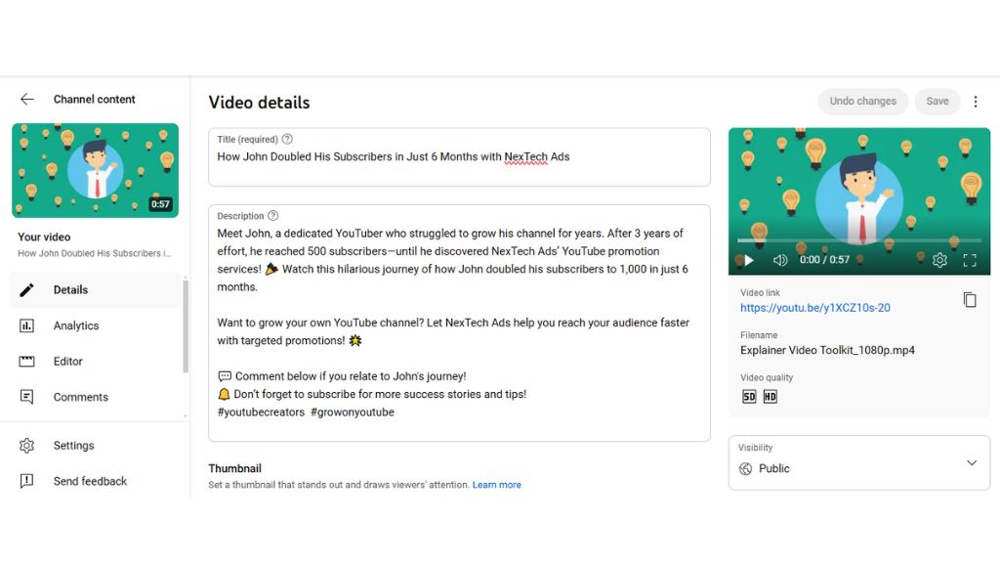
Optimizing Titles, Descriptions, Tags and More
In addition to the above tips, always optimize your metadata. Use clear titles and keyword-rich descriptions to improve SEO. Add relevant tags to help YouTube understand your video’s context. And use end screens and cards to keep people watching multiple videos, which boosts your channel’s overall session time (a strong positive signal). For instance, linking to a related video on your channel via an end screen can turn a one-off viewer into a binge-watcher, raising both impressions and total watch time.
Conclusion
Impressions are the top of the funnel in growing your YouTube channel. They tell you how often YouTube is giving your videos a chance at an audience. By understanding and monitoring your impressions (and related CTR), you can diagnose packaging issues (thumbnails, titles) and distribution issues (audience targeting) on your channel.
Keep in mind that growing impressions is a marathon, not a sprint – especially for new channels. Focus on creating binge-worthy content and then optimizing your thumbnails, titles, and SEO. Post consistently, engage with your viewers, and use all the tools available (tags, end screens, playlists) to encourage longer viewing sessions. Over time, YouTube’s algorithm will reward your efforts with more impressions, which can translate into more views and subscribers.
For creators in India (including here in Kolkata!), remember that help is available. The team at NexTech Ads India in Kolkata specializes in channel growth strategies and organic promotion on YouTube. We combine data-driven tactics (like the ones above) with local market insights to help Indian creators reach their audience. Whether you need a quick audit of your thumbnails and titles or a full promotion strategy, NexTech Ads India can guide you in boosting your YouTube visibility.
Now it’s your turn: dive into YouTube Studio, check your impressions data, and experiment with these tips. As you learn what resonates, your impressions (and views) should steadily climb. Happy creating, and may your thumbnails catch plenty of eyes!
Sources: Official YouTube documentation and analytics guides; industry blogs and analytics experts. These sources explain how impressions work and offer best practices to improve them. They’ve been used to ensure the advice here is up-to-date and actionable.